




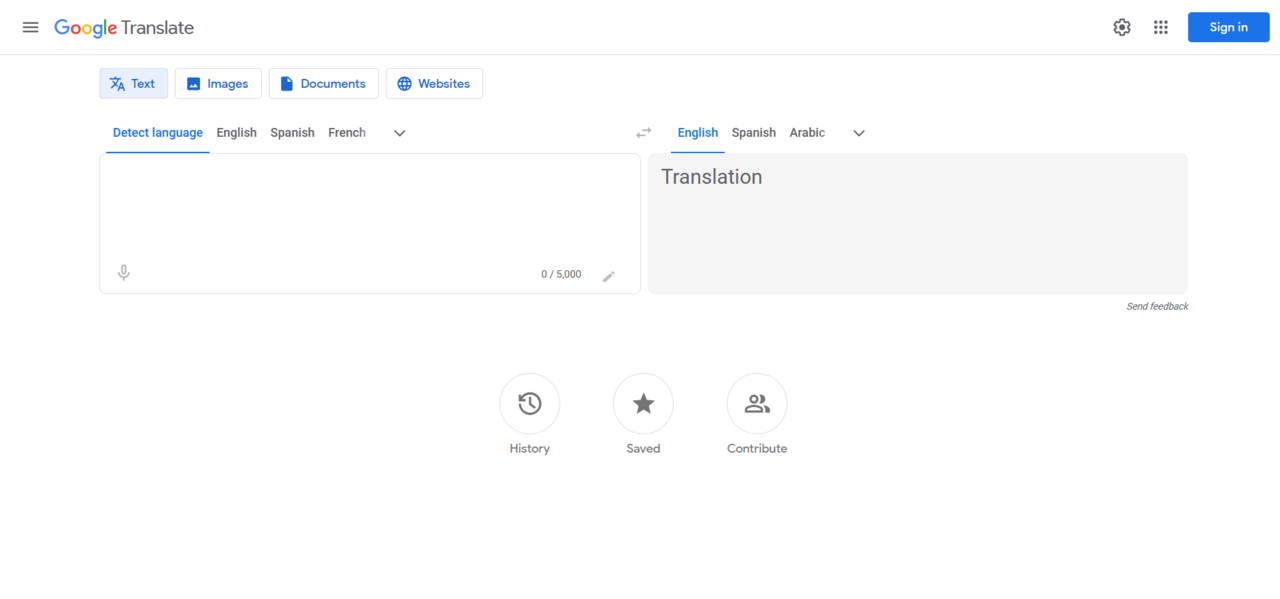
The Google Translate interface update is rolling out on Android, bringing significant changes to enhance user experience. This update aims to make translation easier and more intuitive for users.
What’s new in the Google Translate update?
Google Translate has begun rolling out a major interface update on Android, significantly enhancing user experience. This update introduces a more streamlined and intuitive design aimed at simplifying the translation process for users.
Among the notable changes are:
- New Layout: The interface now features a cleaner layout, making it easier to navigate between text, voice, and camera translation options.
- Enhanced Accessibility: Users can now access translation features more quickly, with buttons and options readily available at their fingertips.
- Improved Visuals: The aesthetic improvements include brighter colors and updated icons that help guide users through various functions.
- Personalized Suggestions: The tool now offers personalized word and phrase suggestions based on user history, allowing for a more tailored translation experience.
- Offline Mode Enhancements: Users can now download specific languages for offline use more easily, ensuring they have access to translations anywhere, even without internet connectivity.
This Google Translate interface update aims to make the translation process more seamless and efficient, catering to the needs of a diverse user base. As users adapt to these changes, many are left wondering: Is this the best change yet for Google Translate?
User reactions to the interface changes
As Google Translate begins to roll out its major interface update on Android, user reactions have been mixed, with many expressing both excitement and skepticism about the changes. Some users have taken to social media to share their experiences, highlighting the improvements in usability and aesthetics.
Positive feedback has focused on the more intuitive layout and easier navigation, which many believe enhances their overall translation experience. A user noted, “The new layout makes it so much easier to switch between languages. It feels much more user-friendly.” Others have praised the updated design, saying it looks more modern and appealing, which has made the app more enjoyable to use.
However, not all reactions have been favorable. Some users have reported difficulties in adapting to the new interface, claiming that certain features have become less accessible. One frustrated user commented, “I liked the old interface better. I find it harder to locate my favorite languages now.”
The interface update has also spurred discussions about whether these changes truly enhance functionality or simply alter the app for aesthetic reasons. Users are still assessing the impact of the Google Translate interface update on their daily tasks, with many hoping that further refinements will address their concerns.
Overall, the feedback indicates a strong interest in how this update will shape the future of the app.
How the update improves translation accuracy
The latest Google Translate interface update introduces a series of enhancements designed to refine translation accuracy. Users will notice that the application now leverages advanced machine learning algorithms, which improve contextual understanding across various languages. This shift aims to reduce errors that often arise from literal translations, providing a more nuanced interpretation of text.
One significant improvement is the incorporation of user feedback into the translation process. Google has implemented a feature that allows users to suggest edits to translations directly within the app. This collaborative approach not only enhances the quality of translations but also helps Google’s algorithms learn from real-world usage, leading to further refinements over time.
Additionally, the update optimizes the interface for better clarity and ease of use. Key terms and phrases are now highlighted, helping users to focus on essential elements of the translation. This change can be particularly beneficial when dealing with complex texts or technical jargon, ensuring that the most relevant information stands out.
Moreover, the new interface utilizes an improved text recognition capability, allowing users to translate text from images with greater precision. Overall, these advancements in the Google Translate interface update mark a significant step toward making translations not only more accurate but also more user-friendly.
Comparing the old and new interfaces
The recent update to the Google Translate interface has sparked interest among users, prompting comparisons between the old and new versions. The previous interface was functional but often criticized for its cluttered layout and lack of intuitive navigation. Many users found it challenging to locate specific features, leading to a less than optimal experience.
In contrast, the newly revamped Google Translate interface boasts a cleaner, more streamlined design. Key differences include:
- Simplified Navigation: The new interface prioritizes user experience with easily accessible menus and tools.
- Enhanced Visuals: A modern aesthetic with improved color schemes and typography makes the app visually appealing.
- Quick Access Features: Users can now quickly switch between languages and access translation history from the main screen.
- Interactive Elements: The inclusion of interactive elements makes it easier to engage with the app, enhancing usability.
While the old interface served its purpose, the update significantly elevates the user experience. Many users have reported that the transition to the new Google Translate interface feels like a breath of fresh air, making it easier and faster to obtain translations. As the update continues to roll out, it will be interesting to see how it impacts overall user satisfaction and translation efficiency.
Tips for using the updated Google Translate
The recent Google Translate interface update has brought several enhancements that can help users make the most out of their translation experience. Here are some tips for navigating the new features effectively:
- Explore the redesigned layout: The updated interface showcases a cleaner, more intuitive design. Take a moment to familiarize yourself with the new menus and options, which are now more accessible than ever.
- Utilize the conversation mode: This feature is ideal for real-time discussions. Activate it when conversing in another language, allowing for seamless back-and-forth translations without needing to switch settings constantly.
- Make use of the camera function: The updated interface enhances the camera translation capabilities. Simply point your device’s camera at text, and the app will automatically translate it. This is particularly useful for signs, menus, and documents.
- Save frequently used phrases: The new interface allows you to save translations for quick access. Use this feature to compile a list of essential phrases for travel or communication.
- Provide feedback on translations: Engage with the app by submitting feedback on the translations. This not only helps improve the service but also tailors the experience to your needs.
By embracing these tips, users can enhance their interactions with the updated Google Translate interface and benefit from its numerous improvements.
Future updates to expect from Google Translate
As Google Translate continues to evolve, users can anticipate several future updates that promise to enhance the overall experience further. The recent Google Translate interface update has set the stage for more improvements, focusing on user feedback and technological advancements.
One of the most anticipated features is the integration of AI-driven personalization. This will allow the app to adapt to individual users’ preferences, making translations more relevant and contextually accurate. Users may soon find that the interface not only learns from previous interactions but also suggests translations based on their most common language pairs.
Additionally, Google is likely to expand on the visual elements of the app. Enhancements to the user interface may include customizable themes and layouts that cater to different preferences. This could provide a more enjoyable and engaging user experience.
Another exciting prospect is the potential for real-time collaboration features. Users could potentially share translations seamlessly with others, which would be especially beneficial for students, travelers, and professionals working in multilingual environments.
Finally, ongoing improvements to voice recognition and image translation capabilities are expected, making the Google Translate interface even more versatile. With these developments on the horizon, it’s clear that the future of Google Translate is bright, and users can look forward to even more enhancements in the coming months.
The recent Google Translate interface update has introduced a more user-friendly design that enhances accessibility. Many users are praising the Google Translate interface update as a significant improvement over previous versions.
via Wikimedia Commons
Read the original
Related stories
vivo V80 Launch: Best Battery Upgrade for Users in August · iPhone 6 India launch: Best date for eager fans · Samsung Galaxy F70 5G: Is It the Best Phone Under 20K?